
Quoting
From the call to a fixed-price quote, in minutes.
Claude reads the call or the website conversation and drafts the quote from your price list and pricing rules: line items, quantities, hours, price, assumptions and payment terms. Nothing goes out until the rep approves it.
On Salesforce? See Run on Claude for Salesforce.
Our own quotes used to take weeks and tens of hours to build. Now they take one Claude prompt and a five-minute review.
Quotes wait on the person who knows the pricing.
A customer asks for a quote on the call. The rep writes notes, rebuilds the scope in a spreadsheet, checks the price list, waits on a discount approval, then formats the document. Days pass before the quote goes out.
Quoting designed as if AI existed from the start
The rep does not rebuild the quote from notes after the call. The quote starts from what the customer said, and the rep's job is to check it.
How it works
- 01
The conversation
A customer call, an email thread or a website conversation.
- 02
Claude drafts the quote
Line items, quantities, hours, price, assumptions and payment schedule, from your price list and pricing rules. Anything the conversation didn't cover is listed as an open question for the rep.
- 03
The rep reviews and approves
Edit any line. Nothing is sent until the rep approves it.
What's in every quote
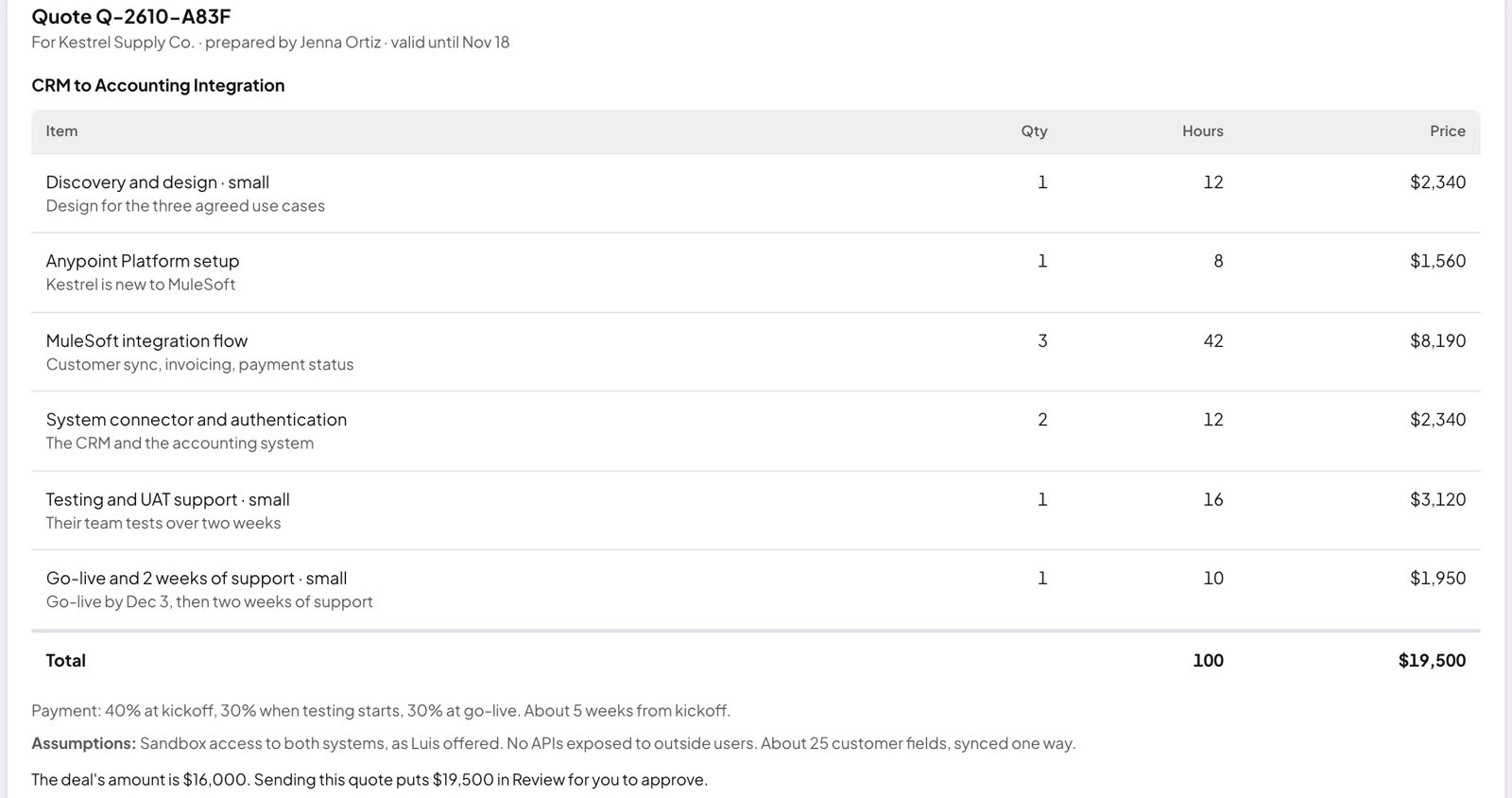
- 1Line items from your price list
- 2Quantity and hours for each line
- 3Price per line and the total
- 4Assumptions, written out
- 5Payment schedule
- 6Valid-until date
Your pricing rules, written down once
How you scope, what each item costs, what you assume, how you bill. They live in skill files on a subscription you hold. You own them, and you can change them.
We set up the rules around how you price: per-hour work, per-seat licenses, bundles, volume and term discounts, and who approves what.
| Item | Rule |
|---|---|
| Implementation | 12 hours (small), 24 (medium), 40 (large) |
| Seat license | $40 per seat per month; 10% off at 50+ seats |
| Annual term | 8% off when paid annually |
| Premium support add-on | 15% of the license total |
| Discount over 15% | Sales leader approves before it goes out |
From quote to proposal to signature
The approved quote is the start, not the end. The same scope feeds every document after it.
- 01
Quote
Drafted from the conversation, approved by the rep.
- 02
Proposal
A branded proposal document built from the approved quote.
- 03
Contract
Drafted from the same scope and terms, using your contract template.
- 04
Signature
Sent through your e-signature tool. The deal record updates when it's signed.
Each step waits for a person to approve it.
Built for how you sell
Scoped work.
Services firms, agencies, MSPs, systems integrators and made-to-order manufacturers that price each job from what the customer described.
Configured products.
Seat licenses, subscriptions, bundles and add-ons, priced from your catalog with your volume and term rules.
Next to your CPQ.
If you already use a CPQ, the approved quote can go there.
For sales leaders, reps, finance and IT
For sales leaders
- Quotes go out the same day as the call.
- Every quote uses the same pricing rules, whoever builds it.
- Discounts above your limits wait for the approver you name.
For reps
- No rebuilding the quote from notes after the call.
- Your job is to check the quote, not type it.
- The proposal and the contract come from the approved quote.
For finance and ops
- Pricing rules and payment terms live in one place.
- Change a rate once, and the next quote uses it.
- Every quote, version and approval is kept with the deal.
For IT and security
- Runs on subscriptions you hold. We run no servers.
- Every change is logged.
- Your pricing rules and quote history stay in your database.
We run on this
Green Irony quotes, proposes and contracts its own work this way. Our quotes used to take weeks and tens of hours to build. Now they take one Claude prompt and a five-minute review. This is our own experience, not a promise for your team.
Next to the CRM you have
The approved quote writes back as a scoped opportunity. The deal's value updates in Pipeline & forecast. On Salesforce? See Run on Claude for Salesforce.
One monthly fee
What it covers
One monthly fee covers support, administration, and the new workflows we build with you.
Billed to you directly
Your Claude and database subscriptions stay billed to you directly.